

Router #
When it comes to privacy and security, Internet service provider (ISP) issued routers and consumer routers have a sordid record. Both have been found to collect and disseminate user data to third-parties.
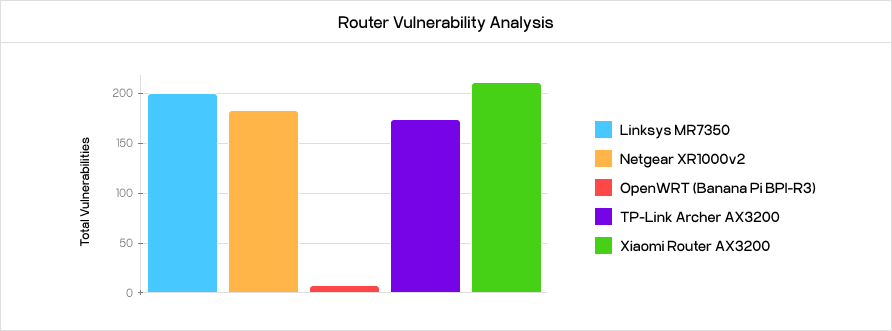
FOSS offerings like OpenWrt and PfSense/OPNsense tend to be far more secure. I’ve tried and enjoyed both operating systems (OSes) very much; however, as someone who moves around a fair bit, I never know what networking situation my next place will have. OpenWRT is indispensable to me for its superior WiFi capabilities.
My router of choice is the GL.iNet’s Beryl AX travel router. It’s portable, cheap—and most importantly—it has a WiFi repeater mode that connects wirelessly downstream from any existing router or hotspot, without needing an Ethernet cable.
Although GL.iNet’s software recently went closed source, stock OpenWrt can easily be flashed onto the router while retaining all functionality.
DNS #
A DNS sinkhole is a Domain Name System (DNS) server that assigns unroutable Internet Protocol (IP) address to unwanted or malicious DNS requests. This includes, but is not limited to, malware, trackers, and ads.
I use the AdGuard Home extension for OpenWrt.
VPNs #
The original purpose of the Virtual private networks (VPNs) was to enable secure and encrypted access to a company’s internal network by remote employees and different office locations.
Privacy #
In the past decade or so, this technology has been repurposed into a privacy tool to prevent Internet service providers (ISPs) from monitoring your activity and selling it.
When you use a VPN (virtual private network), your internet traffic is first sent to a VPN server before it travels on to the site you want to visit. The traffic to the VPN server is encrypted in what’s known as a VPN tunnel, which means that no outsider can see it. For example, if you use Mullvad VPN, all of your traffic is sent to one of Mullvad’s servers and then Mullvad forwards it to where you want to go. It is a bit like when businesses call you from a switchboard, you only see one phone number, rather than the person’ direct dial. This means that the website you visit will see one of Mullvad’s IP addresses (“Mullvad’s switchboard number”) instead of your own. This means your internet supplier only sees that you visit Mullvad, over and over again.
— Mullvad
I use Mullvad as my privacy VPN of choice because it can be used anonymously and offers full IPv6 support.
Mesh VPN #
While privacy VPNs are great, I still have needs for traditional VPN usage. When I leave my home, I’d like to be able to access everything on my servers. Because I am behind double NAT, a traditional VPN like OpenVPN would not work. Instead I use a mesh VPN, Tailscale—it is able to connect my devices without requiring port forwarding, by utilizing NAT traversal.
Syncing #
To keep files like my password database, two-factor authentication (2FA) archive, and notes synced, I use Syncthing. It is able to utilize NAT traversal, global discovery, and relaying to keep my clients synced wherever they are.